As an Amazon Influencer, you can earn from onsite (videos posted on Amazon) and also offsite (sharing affiliate links that bring traffic to Amazon).
A lot of people are nervous to start posting offsite because errors there can get your onsite account shut down. Both are connected, and Amazon polices the offsite linking rules, so the stakes are high.
However, after you learn the rules it's not too tricky to stay in compliance.
Here's the most common rules to be careful of:
✅ Add the website url to your site list (backend Amazon Influencer account)
Whenever you are linking back to Amazon with an affiliate link, the site you are linking from needs to be publicly accessible (like no private Facebook groups or private Instragram page) and linked in your affiliate site list.
You can add a new website to your sitelist anytime. From Creator Connections (signed into your offsite ID), go to the menu at the top right and click on account settings.
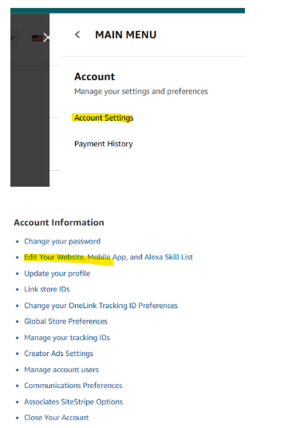
You then want to add the specific account/group/site URL to the sitelist. For example, don’t just put YouTube.com, but instead list your YouTube channel URL, like: youtube.com/datacoachclaire
Here's a **video** by Nicole Vincent walking through how to add sites to your Amazon sitelist and set up affiliate disclosures.
✅ Don't ever change the name or visibility or the social media account that you were approved for Amazon Influencer with.
If it was public and you change it to private or you change the username, it could cause a glitch with your Amazon Influencer account approval.
✅ Add an affiliate disclaimer both to the main description/bio of the offsite page, and also next to every single link.
The disclaimer language Amazon recommends is:
“As an Amazon affiliate I earn from qualifying purchases.” So you could put "(affiliate link)" next to the link and also put that full sentence disclaimer in your bio/longer post description. When in doubt, disclose.
You might see other people not disclosing their affiliate links, but they're playing with fire and could get their account shut down for it.
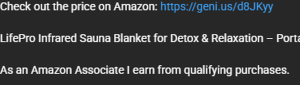
✅ Make sure the customer knows the link is going to Amazon (especially important to be clear if you're using a deeplink tool (like Geniuslink, or ViralVue URLVue) that changes how the link is shown. I use "Check out the price on Amazon" next to my links so it's clear the link is going to Amazon:
This isn’t required by Amazon, but I would also recommend deeplinking your affiliate links. What this means is that when someone opens your link on their phone, the link will go to their Amazon app instead of just their browser. Also, if the customer is in a different country, the deeplink will also direct them to their country’s Amazon page.
I use Geniuslink for deeplinking. It is $6/month and super easy to use (affiliate link).
Other popular ones are PostTap (free, but not as many features as Geniuslink) or ViralVue also has a deeplink feature built in.
✅ Don't include Amazon's name in your channel name (or "Prime") and don't use the Amazon logo(s) ever. Like you can't call a Facebook group "Amazon Deals" or "Amazon Product Reviews" or "Prime Product Finds". I would even avoid AMZ in your name, just to be safe. We don't want to use Amazon's trademarks.
✅ Don't use the brand images in your content (exception: if you are altering the image as part of a collage like for Pinterest. If you're posting elsewhere and the link automatically pulls the product picture that's OK, but don't upload/screenshot the product picture itself).
✅ Avoid sharing prices, unless you keep it updated - if you do want to share about a deal, you have to keep all your posts current (like delete it once the deal/price is no longer valid). If you're advertising a price/deal, it has to be exactly the same as what the customer will see when they click
✅ Wherever you share links must be PUBLICLY accessible (like you can't share affiliate links in a private group/community or private social media page). Exception, you can privately link to an idea list or your storefront, those are fair game links to share anywhere because they have all the affiliate disclaimers built in.
✅ Additional sponsorship disclosure - if you're being paid to make the content, disclose the brand relationship (both verbally if video and in text like #ad)
✅ Don't have any language about "dupe" or "knockoff" when comparing something to another brand
✅ Don't include music in your affiliate posts (more details in the link below of Amazon's rules)
✅ Don't use Amazon written customer reviews as part of your content
✅ One of Amazon's best guides on the rules: Amazon's list of do's and don'ts
Woof! That's a lot. But you got this! If you're ready to begin to post offsite, follow these rules and go for it.
Tomorrow I'll send you some ideas on what type of offsite posting you can do and which platform is likely going to be the highest ROI to start with.
To your growth,
Claire